
Using Your Portfolio Engagement Dashboard
Note: Clarity’s Portfolio Engagement dashboard is a feature of Signal by EverTrue. If you have questions about Signal, please reach out to your Customer Success Manager (CSM).
The Portfolio Engagement dashboard is designed to help you determine the relative recency of engagement with managed prospects, meaning prospects assigned to at least one prospect manager’s portfolio. Engagement is measured here in terms of Interactions, also known as Contact Reports.
Dashboard Elements and Views
Portfolio Engagement has four important elements to help you evaluate your prospects’ relationship timeline.
Toggle Buttons
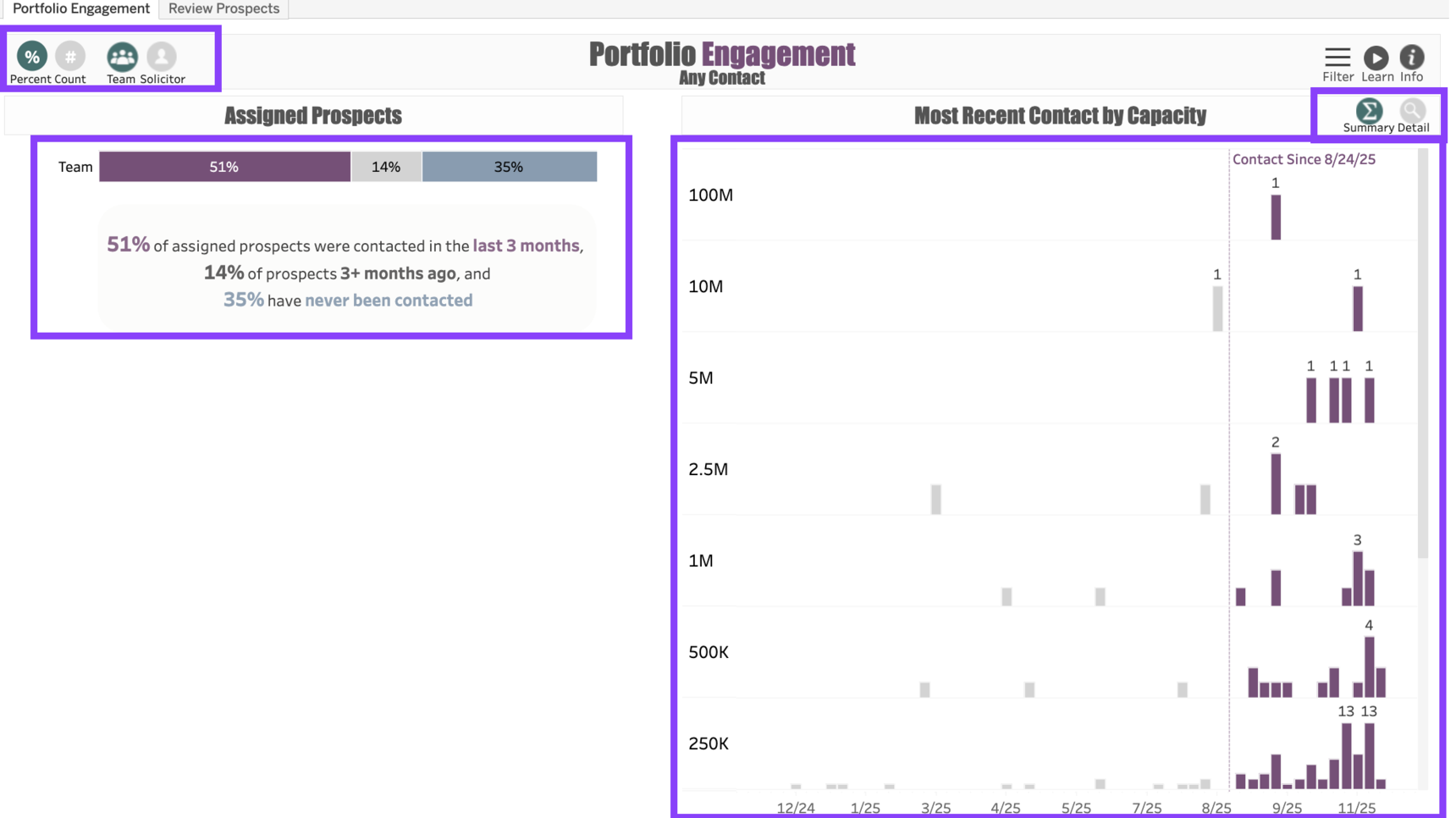
- The Percent and Count toggle buttons convert the Assigned Prospects visualization into either a percentage or a headcount of the prospects.
- The Team and Solicitor toggle buttons allow you to switch between the Team view, which displays all results in the aggregate, or a Solicitor view, which displays each fundraiser's portfolio separately.
- The Summary and Detail toggle buttons allow you to view a Summary of the prospect engagement timeline or a Detail view, which will display every prospect as a separate box along the timeline. The Detail view helps you see which prospects in particular are represented in the Timeline graphic.
Views
The Assigned Prospects view displays the portfolio in three sections: Contacted, Not Contacted, and Never Contacted.
- The Contacted prospects, represented in purple, are those who have had some form of Interaction within the months specified in the dashboard filter.
- The Not Contacted prospects, represented in gray, are those whose most recent contact was past the number of months specified in the dashboard filter.
- The Never Contacted prospects, represented in blue, are those who have no record of Interactions at all.
The Most Recent Contact by Capacity shows all of the most recent Interactions with the prospects along a Timeline, with tiered sections that break out the prospects by Gift Capacity.
Dashboard Filters
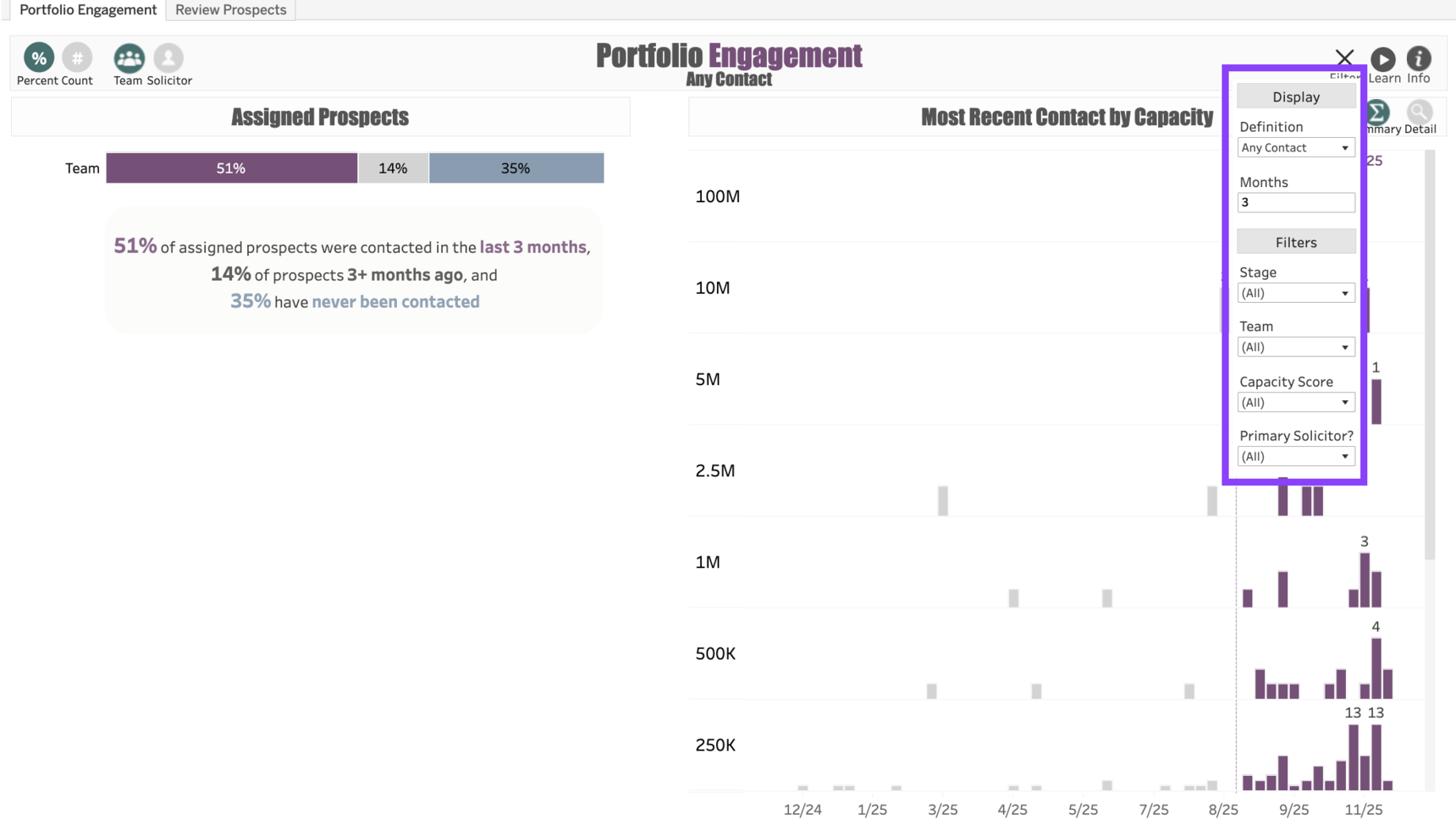
The dashboard can be customized using any of the following Filters:
- Definition: This filter allows you to change the definition from Any Contact to Substantive Contact. The Substantive Contact filter will show you the recency of the most recent substantive contact with the prospects, as indicated by an Interaction Type of Meeting - In Person or Meeting - Virtual or as indicated by a flag marking the Interaction as "Substantive."
- Months: Allows you to change the number of months within which any prospect will be considered "Contacted" in the dashboard.
- Stage: Filters by the Prospect Stage.
- Team: Narrows the results to only prospects assigned to fundraisers on a particular team.
- Capacity Score: Allows you to narrow results to prospects with specified capacity score ranges.
- Primary Solicitor? Selecting Has Primary will only show contact filed by the prospect's Primary Manager, and No Primary will only show contact filed by someone other than the prospect's Primary Manager. Leave the selection All to include any recent contact with the prospect.
Use Cases
Your dashboard views are interactive, made up of clickable and hoverable elements that enable thorough data analysis. Together, dashboard views and filters allow for endless experimentation, customization, and creativity.
Below, we offer a few ways you can strategically use the Portfolio Contacts dashboard, but we encourage you to spend time exploring the dashboard in your own time!
Portfolio Evaluation
You're the manager of the major gifts team, and you would like to see how well your team is engaging with their assigned prospects.
Stewardship Review
You're the manager of Donor Relations and you'd like to see how prospects in Stage Stewardship are being engaged.
Substantive Contact
I'm a fundraiser who wants to see how many of my prospects have had a Substantive Interaction.
These are just some of the ways you can use the Portfolio Engagement dashboard to better understand your fundraising performance. Let us know how you’re using it!
For any other questions, reach out to EverTrue Support at genius@evertrue.com.
Reply
Content aside
- 9 mths agoLast active
- 29Views
-
1
Following