
-
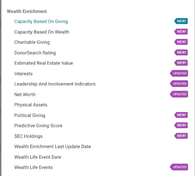
What's new in Signal: Enhanced Wealth Enrichment Filters July 2026
EverTrue has expanded Signal's wealth enrichment filters with new and updated options powered by DonorSearch data. You can now search and segment your full constituent database using capacity ratings,…
-
Setting Up SMS & MMS Texting for Your Organization
Before your team can send text messages through Cadences 2.0, your organization needs to complete a one-time A2P 10DLC registration. This is a federal carrier compliance requirement.…
-
Cadences vs. Cadences 2.0: What’s the Difference?
This article is for users who want to understand what is new in Cadences 2.0, how the newer tools differ from the original Cadences (now known as Cadences 1.0), and where to start in the product.…
-
Understanding Cadence Blueprints
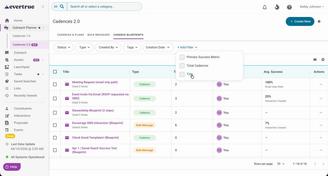
Understanding Cadence Blueprints Summary A cadence blueprint is a reusable template for a cadence. Instead of building the same outreach strategy from scratch each time,…
-
Assets: Set up Email and Signature Templates
Set Up Email and Signature Templates in Assets Why use Assets Assets gives users a single place for email templates and signatures, instead of having to hunt for templates in the email composer.…
-
Review Bulk Message Performance and Recipient Status
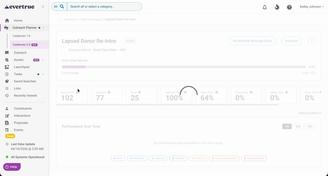
Review Bulk Message Performance and Recipient Status What this article covers Goal performance and progress against the selected metric Sends, deliveries, opens, clicks, replies, skips, errors,…
-
DNS Setup for Cadences 2.0
Domain Name System (DNS) Setup for Cadences 2.0 Before your organization can send automated emails or bulk messages through Cadence 2.0, an organization owner must configure and verify a sending…
-
Cadences 2.0 FAQ
Cadences 2.0 FAQ What is Cadences 2.0? Cadences 2.0 is an outreach workspace for planning, sending, and tracking email-based communication. It supports multi-step cadences, one-time bulk messages,…
-
Create a Cadence Blueprint
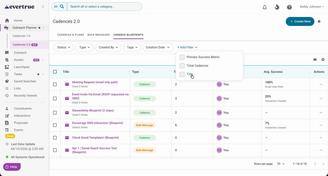
Create a Cadence Blueprint When to use a cadence blueprint Create a cadence blueprint when your team has a repeatable outreach strategy that should be reused across multiple live cadences.…
-
Create and Send a Bulk Message
Create and Send a Bulk Message Use a bulk message when you want to send one email to many recipients at one time, and the content is mostly the same for everyone, with only light personalization,…
-
Clarity Data Validation Guide
This guide will support you through the process of validating your Clarity data so that it matches your internal reporting. Your Data Validation Team Your implementation partner will ask you to…
-
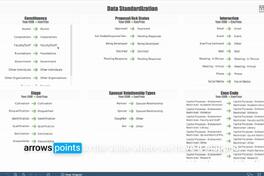
Using Your Data Standardization Dashboard
Data Standardization is a dashboard to help you get the most out of your other Clarity dashboards by helping you see how EverTrue is currently interpreting your data.…
-
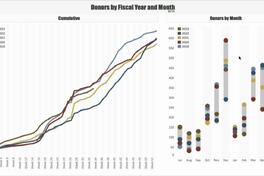
Using Your Donors by Fiscal Year and Month Dashboard
Note: Clarity’s Donors by Fiscal Year and Month dashboard is a feature of Signal by EverTrue. If you have questions about Signal, please reach out to your Customer Success Manager (CSM).…
-
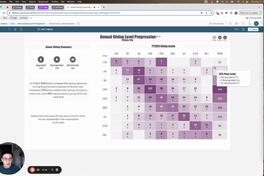
Using Your Annual Giving Level Progression Dashboard
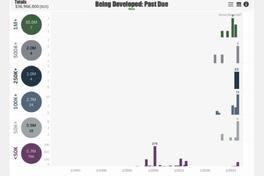
The Annual Giving Level Progression dashboard is designed to help you track the giving velocity of annual giving donors. Dashboard Elements and Views Annual Giving Level Progression has four elements…
-
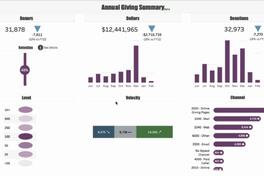
Using Your Annual Giving Summary Dashboard
The Annual Giving Summary dashboard is designed to help you compare the year-to-date performance of your annual giving program to the performance last year.…
-
Using Your Proposal Pipeline Dashboard
The Proposal Pipeline dashboard is designed to help you review all proposals or opportunities currently in the gift pipeline. You can use it to identify proposals that need attention and to forecast…
-
Using Your Portfolio Engagement Dashboard
Note: Clarity’s Portfolio Engagement dashboard is a feature of Signal by EverTrue. If you have questions about Signal, please reach out to your Customer Success Manager (CSM).…
-
Using Your Fundraiser Insights Dashboard
Note: Clarity’s Fundraiser Insights dashboard is a feature of Signal by EverTrue. If you have questions about Signal, please reach out to your Customer Success Manager (CSM).…

-
Signal Outreach FAQs
Note: In-app outreach is a feature of Signal by EverTrue. If you have questions about Signal, please reach out to your Customer Success Manager (CSM). Signal Email What is Signal Email?…
-
Managing Signal Phone Outreach
Note: In-app outreach is a feature of Signal by EverTrue. If you have questions about Signal, please reach out to your Customer Success Manager (CSM). With Signal Phone,…
-
Managing Signal Email Threads
Note: In-app outreach is a feature of Signal by EverTrue. If you have questions about Signal, please reach out to your Customer Success Manager (CSM). Signal makes it easy to manage your email…
-
Scheduling Emails in Signal
Note: In-app outreach is a feature of Signal by EverTrue. If you have questions about Signal, please reach out to your Customer Success Manager (CSM). With Signal Email,…
-
Using Signal Email Drafts
Note: In-app outreach is a feature of Signal by EverTrue. If you have questions about Signal, please reach out to your Customer Success Manager (CSM). Signal Email makes it easy to draft emails in…
-
Navigating the Outreach Tab
Note: In-app outreach is a feature of Signal by EverTrue. If you have questions about Signal, please reach out to your Customer Success Manager (CSM). The Outreach tab is your home for managing all…
-
Editing Your Signal Videos
Note: Signal Video Powered by ThankView is a feature of Signal by EverTrue. If your team is interested in using Signal, please reach out to your Customer Success Manager (CSM).…