
Signal Updates: SMS feature added, expanded merge fields, and a redesign
We have three updates shipping together today, and each one removes a friction point that has been on your radar for a while. Here is what is new.
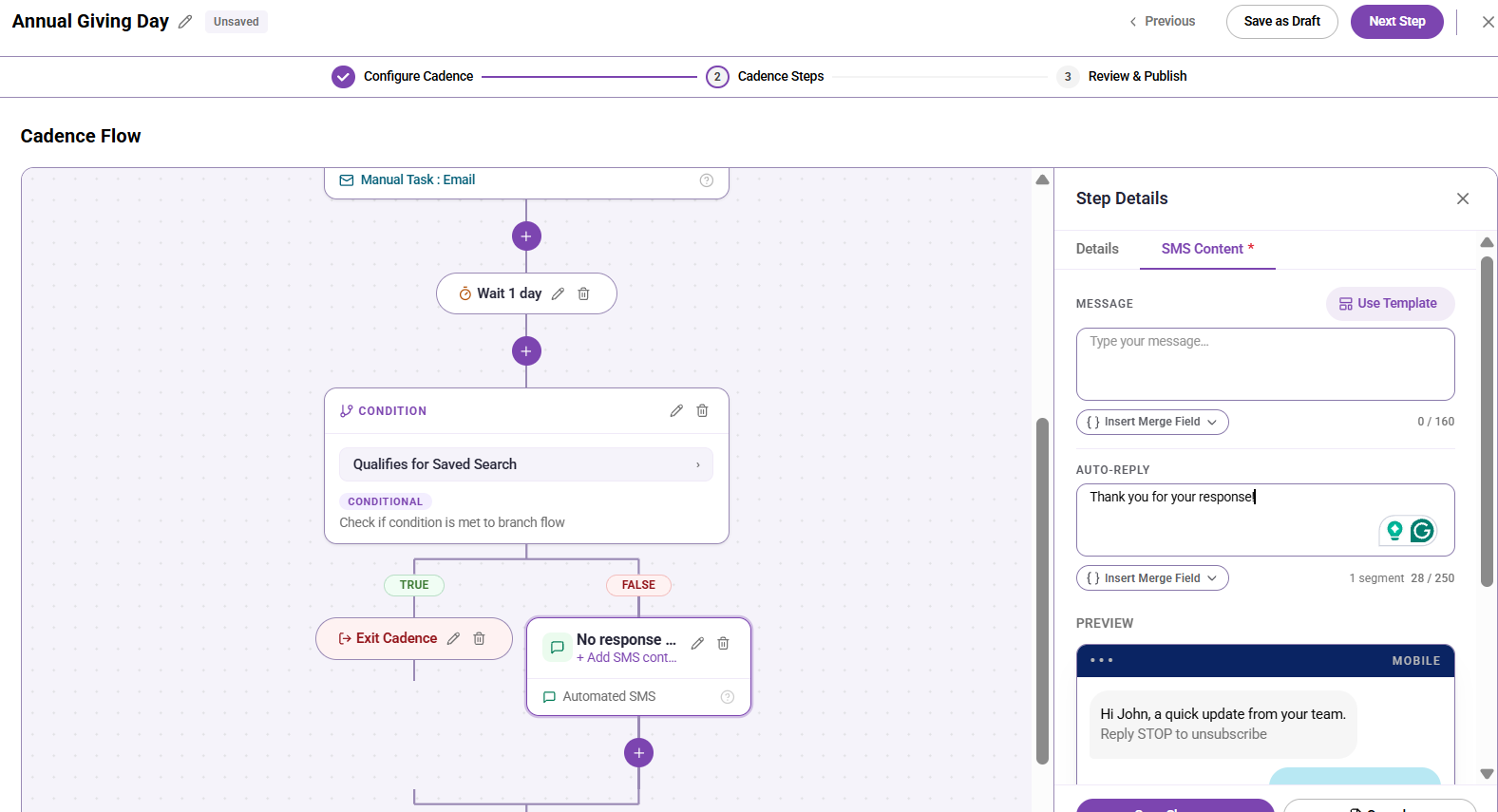
SMS outreach in Signal
You can now reach constituents by text directly from Signal. No third-party tool, no separate workflow. SMS is available in two places:
Bulk messages: Select SMS as the channel when creating a new bulk message. Set a success metric, write your message, add an auto-reply, choose recipients, and send.
Cadences 2.0: Add an Automated SMS step to any multi-step cadence. Combine it with email steps, wait periods, and conditions in the same flow.
SMS also gets its own template library. Go to Assets > SMS Templates to create, save, and reuse message content across bulk sends and cadence steps.
A few things to know before you get started:
Your organization must complete A2P 10DLC registration before SMS is available. This is a one-time setup completed by an administrator in Organization Settings. If you have questions, contact your Customer Success Manager.
SMS messages are limited to 160 characters per segment. "Reply STOP to unsubscribe" is automatically appended and does not count toward that limit.
Because Signal does not support two-way texting, constituent replies are forwarded to the email address you configure in Sender Details. Your auto-reply message lets constituents know their message was received.
Recipients without a primary phone number on file will be skipped. They will not cause an error — the send simply will not attempt delivery to that contact.
Read the Sending SMS in Cadences 2.0 help article to get started.
Expanded merge fields
Merge fields in Signal email and SMS now include significantly more options. Previously, merge fields were limited to a few name and contact fields. The updated panel adds giving data, additional name fields, and your organization's custom fields.
Category |
Fields now available |
Name data |
Your Name, Prefix, First Name, Nickname, Middle Name, Last Name, Suffix, Maiden Name |
General constituent data |
Constituency, Graduation year, Phone (primary), Email (primary) |
Contact giving data |
Lifetime giving amount, Last gift amount, Last gift date, Last gift designation |
Constituent custom fields |
All custom fields your organization has enabled with Profile Display turned on — the list is org-specific |
This means you can now write one automated email or SMS that says "Thank you for your recent gift of [Last gift amount] to [Last gift designation]" and let the system fill in the right values for each person. No more writing individual messages for personalized gift acknowledgments.
Merge fields work the same way in email templates, SMS templates, email bulk messages, SMS bulk messages, and automated cadence steps. Click Insert Merge Field in any composer to access the full panel.
Note: If a merge field value is empty for a contact, that message will be skipped for that contact at send time. Review your audience before sending if you plan to use giving data fields.
Signal redesign
The Signal interface had aged alongside years of feature additions, resulting in a UI that made reading tables difficult, was getting a little dated, and had some inconsistencies that created confusion. The redesign gives users a faster, easier-to-navigate, cohesive experience with the same workflows and cleaner execution.
You will notice the changes across navigation, tables, and the overall visual language of the app. Your data, your cadences, your templates, and your settings are all exactly where they were. Only the presentation has changed.
Get started
SMS setup: contact your administrator to confirm A2P 10DLC registration is complete.
Merge fields: open any email or SMS composer and click Insert Merge Field to explore the expanded options.
Redesign: no action needed — the update applies automatically.
Questions? Reach out to your Customer Success Manager or visit the EverTrue Help Center for updated documentation on all three features.
Content aside
- 9 hrs agoLast active
- 10Views
-
1
Following