
-
Signal Updates: SMS feature added, expanded merge fields, and a redesign
We have three updates shipping together today, and each one removes a friction point that has been on your radar for a while. Here is what is new. SMS outreach in Signal You can now reach…
-
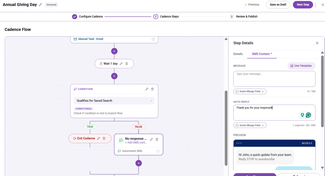
Sending SMS in Cadences 2.0
Sending SMS in Cadences 2.0 Summary: Learn how to send an SMS bulk message, add an Automated SMS step to a cadence, and create and use SMS templates. SMS is available to organizations that have…
-
Tracking Manual Email Metrics in Cadences 2.0
Cadences 2.0 now tracks email metrics for manual 1:1 emails. If you send a manual email as part of a cadence step, that email's performance data now appears alongside your automated email data on the…
-
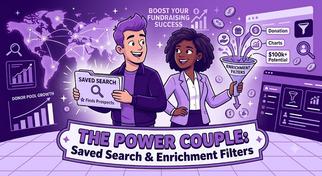
Building Saved Searches using Enrichment Filters & Adding to a Cadence
Signal's wealth enrichment filters become more powerful when combined with saved searches. A saved search stores a filtered list of constituents and updates automatically as your database changes —…
-
Setting Up SMS & MMS Texting for Your Organization
Before your team can send text messages through Cadences 2.0, your organization needs to complete a one-time A2P 10DLC registration. This is a federal carrier compliance requirement.…
-
Cadences vs. Cadences 2.0: What’s the Difference?
This article is for users who want to understand what is new in Cadences 2.0, how the newer tools differ from the original Cadences (now known as Cadences 1.0), and where to start in the product.…
-
Understanding Cadence Blueprints
Understanding Cadence Blueprints Summary A cadence blueprint is a reusable template for a cadence. Instead of building the same outreach strategy from scratch each time,…
-
Assets: Set up Email and Signature Templates
Set Up Email and Signature Templates in Assets Why use Assets Assets gives users a single place for email templates and signatures, instead of having to hunt for templates in the email composer.…
-
Review Bulk Message Performance and Recipient Status
Review Bulk Message Performance and Recipient Status What this article covers Goal performance and progress against the selected metric Sends, deliveries, opens, clicks, replies, skips, errors,…
-
Cadences 2.0 Guide
Cadences 2.0 Guide This guide combines the key articles for Cadences 2.0. Use the contents below to jump to the section you need. 1. Cadences 2.0: what's new Cadences 2.…
-
Skip and Error Logic for Emails
Skip and Error Logic for Emails Skipped logic A send or step is marked as Skipped when the system never attempts the send because the contact isn't eligible at that moment.…
-
DNS Setup for Cadences 2.0
Domain Name System (DNS) Setup for Cadences 2.0 Before your organization can send automated emails or bulk messages through Cadence 2.0, an organization owner must configure and verify a sending…
-
Understanding Prospect Plans
Understanding Prospect Plans Summary A prospect plan is a multi-step outreach plan built for one specific constituent. It gives fundraisers a way to keep individualized strategy, progress,…
-
Cadences 2.0 FAQ
Cadences 2.0 FAQ What is Cadences 2.0? Cadences 2.0 is an outreach workspace for planning, sending, and tracking constituent communication across email and SMS.…
-
Cadences 2.0 Glossary of Terms
Cadences 2.0 Glossary of Terms Use this glossary as a quick reference for product terms, statuses, workflow actions, and reporting language. Cadences 2.…
-
Create and Publish a Cadence
Create and Publish a Cadence When to use a cadence Use a cadence when you need more than one outreach step, such as an email followed by a waiting period, a response check,…
-
Create a Cadence Blueprint
Create a cadence blueprint Use a cadence blueprint when you want to save a repeatable outreach structure that others can reuse later. A blueprint can include a success metric,…
-
Create and Send a Bulk Message
Create and Send a Bulk Message Use a bulk message when you want to send one email to many recipients at one time, and the content is mostly the same for everyone, with only light personalization,…