
Tracking Manual Email Metrics in Cadences 2.0
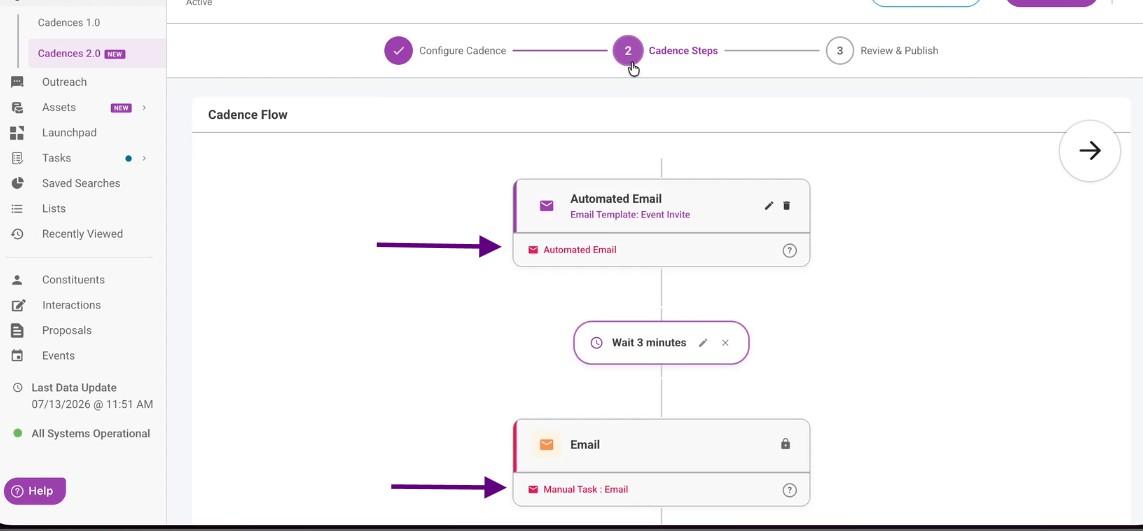
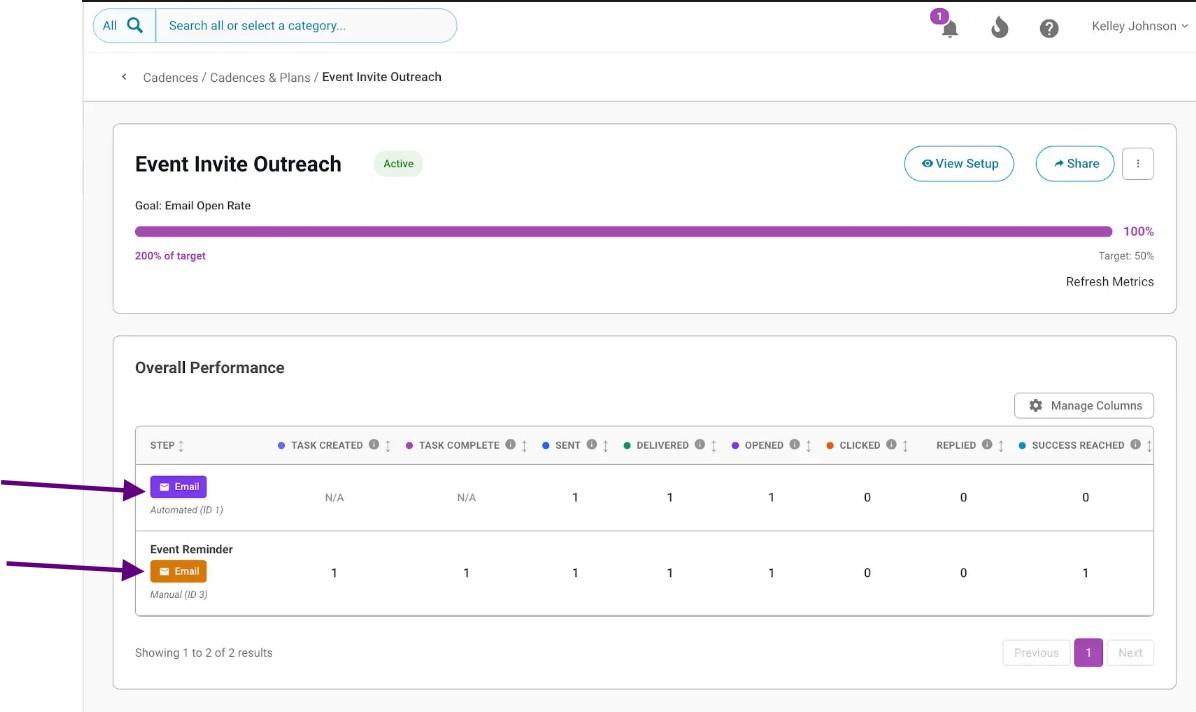
Cadences 2.0 now tracks email metrics for manual 1:1 emails. If you send a manual email as part of a cadence step, that email's performance data now appears alongside your automated email data on the Cadences 2.0 detail page.
What's new
Previously, email metrics in Cadences 2.0 only reflected bulk and/or automated emails sent through a cadence. Manual 1:1 emails were not tracked, even when they were part of a cadence step.
Manual email tracking is now included. Sends, deliveries, opens, clicks, and replies for manual emails are now captured and displayed alongside automated email data on the cadence detail page.
How to make sure your manual emails are tracked
Manual email tracking only works if you send the email from the Manual Tasks page. Sending an email directly from a constituent's profile will not associate it with the cadence, and it will not appear in your reporting.
Important: Always send manual cadence emails from the Manual Tasks page by clicking the Email button on the task. Do not open the email from the constituent's profile because that type of send will not be captured in Cadences 2.0 reporting.
Follow these steps to send a manual email that is captured in cadence reporting.
1. Open the Manual Tasks area.
2. Find the Cadences 2.0 you are working on and locate the manual email task.
3. Click the Email button directly on the task.
4. Compose and send your email. The send is now tied to the task and to the cadence.
https://www.loom.com/share/d0ab2cab18af4a62803f96c79fed6e5c
What data you can see
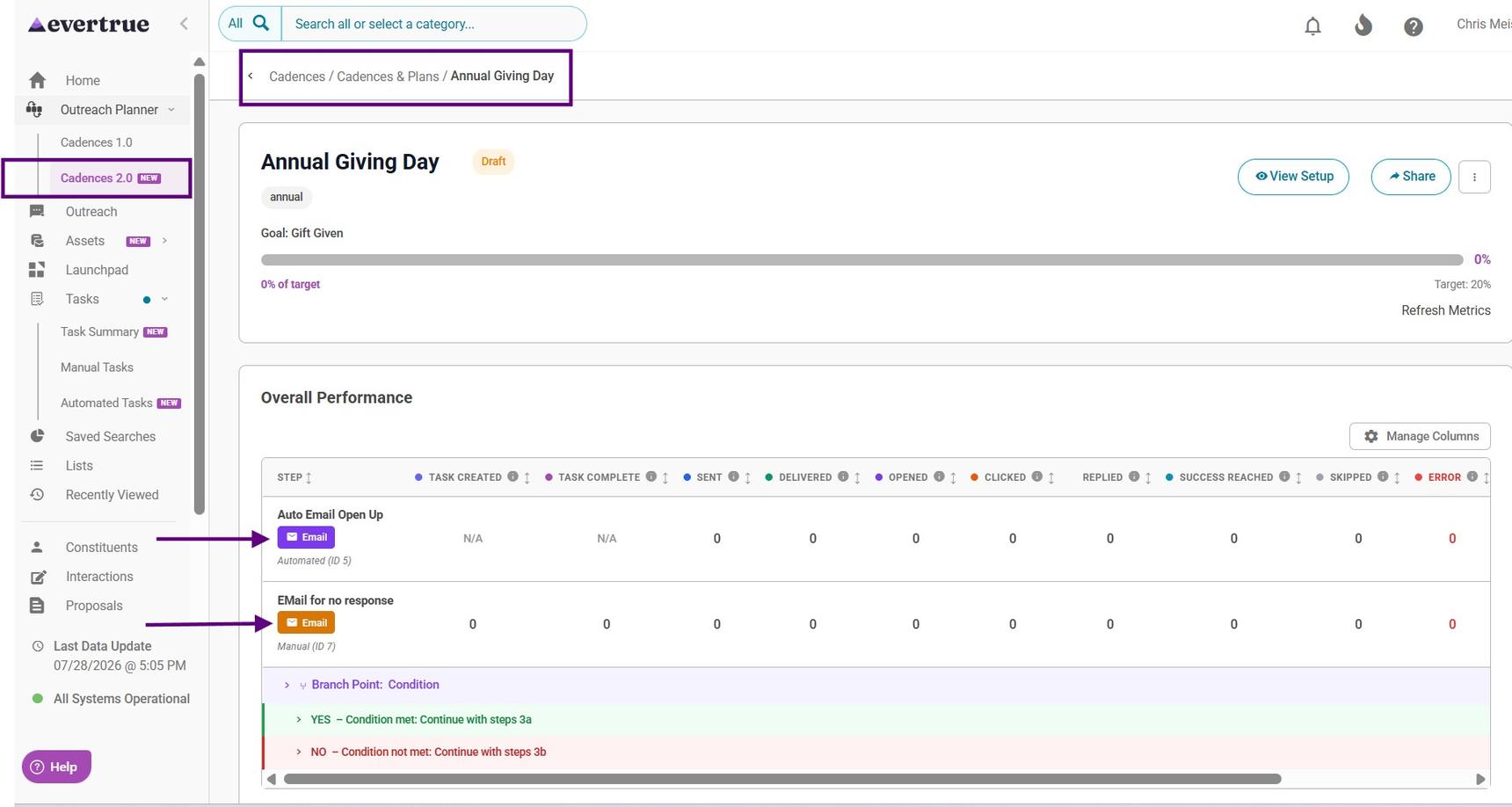
Once a manual email is sent from the Manual Tasks page, its data appears on the Cadences 2.0 detail page. The following metrics now include both automated and manual emails.
Metric |
What it shows |
Sends |
Total number of emails sent, including both automated and manual emails. |
Deliveries |
Emails confirmed as delivered to the recipient's inbox. |
Opens |
Emails opened by the recipient. |
Clicks |
Links clicked within an email. |
Replies |
Replies received from recipients. |
Goal performance |
The percentage of constituents in the cadence who have met the success criteria. Calculated based on total constituents, not total emails sent. |
How metrics are calculated
Email metrics and goal performance are calculated differently. Understanding the difference prevents confusion when reviewing your cadence data.
Email metrics
Sends, deliveries, opens, clicks, and replies are calculated based on automated and manual emails sent in the cadence. The percentages shown are averages across every email that went out.
For example: if a cadence sent 2 automated emails and 1 manual email, and the manual email received an open, a click, and a reply, each of those metrics would show 33% — because 1 out of 3 total emails generated that activity.
Goal performance is calculated based on the number of constituents who have met the cadence's success criteria. For example: if a cadence’s goal is focused on email open rate, there are two constituents in the cadence – Jamie and Steve – and one Jamie opened at least one email in the cadence while Steve opened none, the goal performance in the cadence will show 50%. This will be true even if Jamie and Steve were both sent 100 emails each in the cadence, and only one email was opened by Jamie and zero were opened by Steve, because the math will always be 1 constituent who opened an email / 2 total constituents in the cadence.
Note: Goal performance and email metrics measure different things. A cadence with an open rate goal can have a goal that looks strong, even if email open rates are lower.
View manual email activity by constituent
You can see the full activity for each constituent directly on the Cadence 2.0 detail page. This includes automated email steps, manual task completion, and manual email sends, deliveries, opens, clicks, and replies.
1. Open your Cadence 2.0 detail page.
2. Scroll down to locate the constituent you want to review in the Performance and Recipient table.
3. Select the constituent to expand their activity detail.
https://www.loom.com/share/a3856b4a404f4e09a7d7970af390e3c4
Current limitations
Automated email steps show a breakdown of sends, deliveries, and opens by step over time. This level of detail is not yet available for manual email tasks. Step-level manual email reporting is planned for a future release.
For any other questions, reach out to EverTrue Support at genius@evertrue.com.
Content aside
- 2 mths agoLast active
- 25Views
-
1
Following