
Cadences 2.0 FAQ
Cadences 2.0 FAQ
What is Cadences 2.0?
Cadences 2.0 is an outreach workspace for planning, sending, and tracking constituent communication across email and SMS. It supports multi-step cadences, one-time bulk messages, reusable blueprints, and reporting that shows what happened at both the message and recipient level.
What is the difference between a cadence, a bulk message, and a blueprint?
They serve different jobs.
• A cadence is a sequence of steps over time, such as an email, a wait period, a condition, and a follow-up task or reminder.
• A bulk message is a one-time message (email or SMS) sent to many recipients at once.
• A blueprint is a reusable starting structure that helps teams build consistent live cadences without starting from scratch each time.
When should I use a cadence instead of a bulk message?
Use a cadence when the outreach includes multiple steps or follow-up logic. Use a bulk message when you want to send one message to many people, and the content is mostly the same for everyone.
What are prospect plans?
Prospect plans use the same underlying system as cadences, but they are meant for more customized, higher-touch outreach that a fundraiser may want to duplicate for similar prospects later.
Set up and sending
Do we need any setup before we can send emails?
Yes. Before your organization can send automated emails or bulk messages, an owner must complete DNS setup for the sending domain. Until that setup is finished, users can still create cadences, bulk messages, and blueprints, but sending attempts will fail.
Who can complete DNS setup?
An EverTrue user with an owner role begins the DNS setup. That person enters the sending domain, generates the DNS records, and works with the organization’s IT or domain administrator to publish the records if needed.
Can we keep building while the DNS setup is still pending?
Yes. Users can continue building cadences, bulk messages, blueprints, audiences, and content while verification is in progress. The only limitation is that sends will not go out until the domain is verified.
Do we need any setup before we can send SMS?
Yes. Before your organization can send SMS messages, an administrator must complete A2P 10DLC registration in Organization Settings. This is a one-time carrier registration that enables text message delivery. Until registration is complete, the Text channel option will not be available in Cadences 2.0. Refer to the Setting Up SMS & MMS Texting article for instructions.
My organization already sends SMS through ThankView. Do we still need to complete A2P 10DLC registration for Signal?
Yes. All organizations must register individually to send SMS through Signal Cadences 2.0. Prior SMS activity through ThankView does not carry over. Each organization needs its own A2P 10DLC registration to meet current US carrier compliance requirements. Refer to the Setting Up SMS & MMS Texting article for the full walkthrough.
Can I use email templates, SMS templates and signatures?
Yes. Assets gives users one central place to create, store, organize, and reuse email templates, SMS templates, and email signatures. Email templates can be used in bulk messages and automated email cadence steps. SMS templates can be used in bulk text messages and Automated SMS cadence steps.
Should I still review a template before sending?
Yes. Templates save time, but they are a starting point, not a substitute for review. Check merge fields, formatting, sender details, links, and the final message context before you send.
How can I prevent the same constituent from getting added to the same cadence again and again?
A constituent cannot be re-enrolled into the same cadence more than once every seven days. This helps prevent repeated short-cycle enrollment. Even with that guardrail, users should still design cadence audiences carefully, especially when using rolling saved-search criteria.
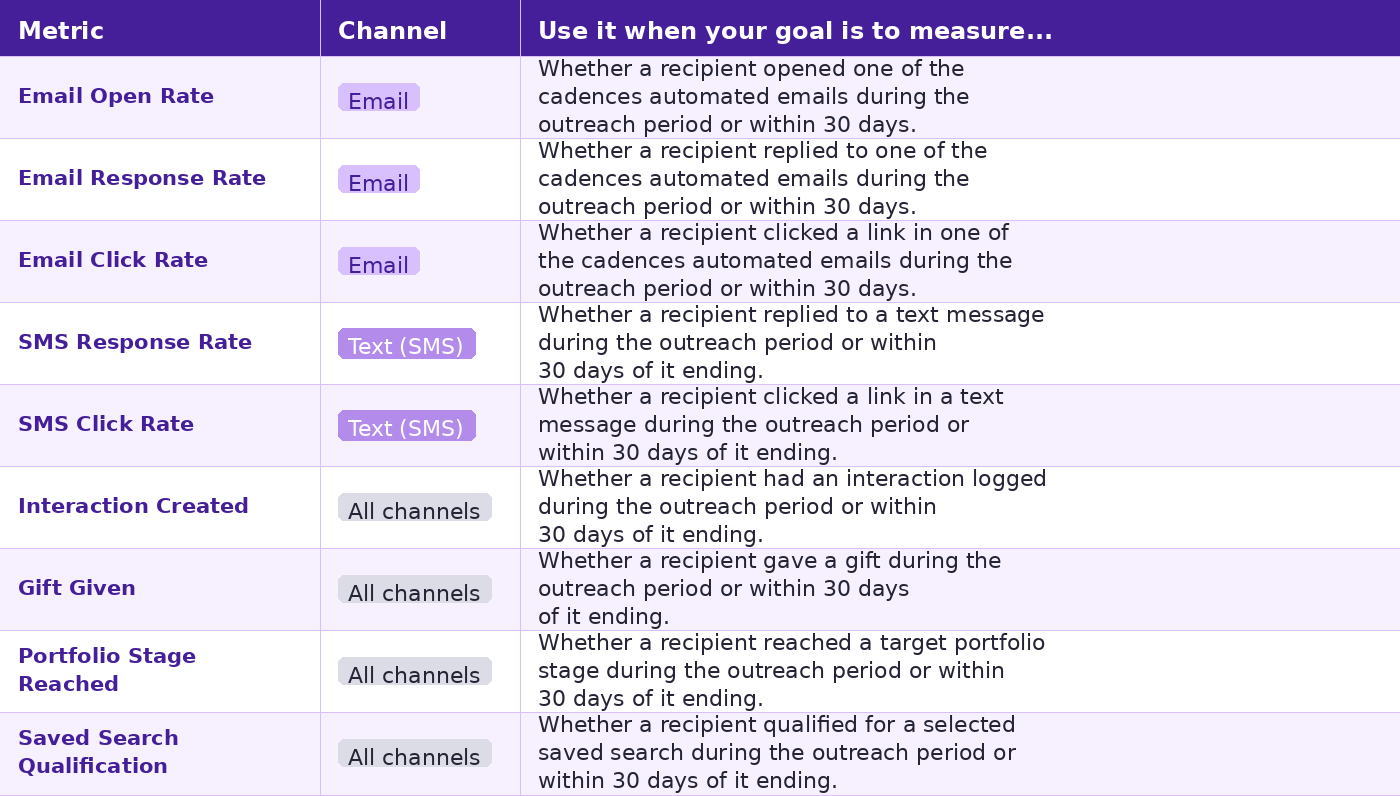
How success is measured (TABLE)
Working with cadences
What can a cadence include?
A cadence can include automated emails, automated SMS steps, manual tasks, wait steps, branching decisions, recipient rules, exit conditions, sender details, sharing settings, tags, and enrollment controls.
Can I add an SMS step to a cadence?
Yes. Select Automated SMS from the Add Step panel in the cadence flow. Configure the message content, merge fields, and auto-reply in the SMS Content tab of the Step Details panel. Contacts without an available mobile phone number will be skipped at the SMS step but remain in the cadence.
Do I have to add recipients right away?
No. You can create and publish a cadence first, then add recipients later if that fits your workflow.
Can a cadence keep adding new people automatically?
Yes, if the cadence is tied to a saved search. As new contacts qualify for that saved search, they can continue to enter the cadence based on your setup.
What does lock enrollment do?
Lock enrollment keeps the cadence limited to the original audience you selected. That helps prevent additional contacts from being enrolled outside the setup you intended.
What are exit conditions?
Exit conditions are rules that automatically remove a contact from a cadence when a separate event happens, such as being added to a list, qualifying for a saved search, qualifying for another cadence, or reaching a portfolio stage.
Other conditions include the following:
- The constituent has unsubscribed from outreach
- Outreach bounces, and no alternative contact info is available
- The constituent is missing required info for the next step (e.g., no email)
- The constituent is missing a value in a merge field in one of the cadence messages
Can I control how many times someone goes through a cadence?
Yes. Use the enrollment limit setting if you want to restrict contacts to one cadence at a time.
If I remove someone from a cadence, what happens to any tasks already created for them?
If you remove someone from a cadence, any cadence-related tasks that were already created for that person are removed from the assigned user’s active task list. They will no longer appear as tasks to complete for that cadence flow.
What happens if I archive a cadence while people are still in it?
If a cadence is archived while contacts are still active in it, those contacts stop progressing through the cadence. They will no longer receive automated messages or new tasks from that cadence.
How do we prevent the same constituent from being added to the same cadence again and again?
Cadences 2.0 includes a built-in safeguard that prevents a contact from being re-enrolled in the same cadence more than once within seven days. This helps reduce repeated short-cycle enrollment.
Even with that safeguard, it is still a good idea to set up saved searches and cadence timing carefully. For example, if a cadence uses a rolling audience such as “gave in the last 30 days,” a contact could still be re-enrolled later if they continue to qualify after the seven-day window has passed.
Do automated messages send on weekends and holidays?
Automated emails in multi-step cadences respect blackout dates, including weekends and configured holidays. If an automated send would normally go out during a blackout period, it waits until the next available sending time.
How does re-enrollment work for cadences that use a saved search audience?
Saved search cadences are checked regularly for qualifying contacts. People already active in the cadence are not added again. People who finished or exited earlier may be added again later if they still qualify, unless the cadence is set to allow only one-time enrollment.
If someone stops qualifying for the saved search later, are they automatically removed from the cadence?
No. Once someone has entered the cadence, losing saved-search qualification later does not automatically remove them. They stay in the cadence unless another action, rule, or exit condition removes them.
Working with bulk messages
What is a bulk message best for?
Bulk messages are best for broad one-time outreach, such as newsletters, event invitations, updates, or appeals, when the email or SMS content is mostly the same for the full audience.
Can I send a bulk SMS message?
Yes. When creating a bulk message, select Text as the channel on the Configure step. The message content step will update to show SMS-specific fields, including the message body, auto-reply, and sender details. Success metric options will filter to SMS Response Rate and SMS Click Rate.
Can I personalize a bulk message?
Yes, lightly. Bulk messages support merge fields and sender settings. Available merge fields include name data, general constituent data, contact giving data, and your organization's custom fields. Contact EverTrue Support to add custom fields for your organization at genius@evertrue.com
Can I test or schedule a bulk message?
Yes. Users can send a test message before launch and can choose to send immediately or schedule the message for a later date and time when that option is available.
What should I check before launching a bulk message?
Review the subject line, body, sender details, audience, merge fields, links, chosen success metric, timing, and any advanced settings. Checking the audience before launch is still one of the best ways to avoid mistakes.
Can I turn off the bulk message feature?
Yes. Contact EverTrue Support at genius@evertrue.com to disable this feature.
Do automated messages send on weekends and holidays?
By default, a bulk message is sent at its scheduled time, even if that falls on a weekend or holiday. If you want a bulk message to follow blackout dates and pauses, turn on the Respect blackout dates and pauses setting during setup.
What happens if a recipient does not have a phone number on file and I send a bulk SMS?
That recipient will be skipped. EverTrue will attempt delivery using all available mobile phone numbers on the contact record, trying up to three times. If no mobile number is found, the contact is skipped and will not receive the message. You can see skipped recipients on the bulk message detail page.
Blueprints and reuse
What is a cadence blueprint?
A cadence blueprint is a reusable framework for a live cadence. It can include the goal, step order, wait times, email content, and conditional logic, so other users can start from a proven structure instead of rebuilding it each time.
Is a blueprint the same thing as a live cadence?
No. A blueprint is not live outreach. It is a reusable starting point. A user creates a live cadence from the blueprint and can then tailor the live version as needed.
Can a blueprint include an SMS step?
Yes. Blueprints can include Automated SMS steps. When a user creates a live cadence from a blueprint with an SMS step, they inherit the step structure. SMS content and the auto-reply can be edited in the live cadence before publishing.
Why would a team use blueprints?
Blueprints help standardize strong outreach practices, reduce repetitive setup work, and make it easier for teams to reuse an approach across regions, roles, or campaigns while still allowing local ownership of the live cadence.
Reporting and recipient statuses
Where do I review results?
Open the detail page for a cadence or bulk message. That is where performance data, recipient statuses, progress toward the selected goal, and follow-up options come together.
What should I look at first on a reporting page?
Start with the goal or progress area, then review the headline counts, then use filters or the recipient table to drill into specific outcomes or people.
Can I see what happened to one specific person?
Yes. Use the recipient table and search for the person by name. You can then review delivery, opens, clicks, replies, skips, errors, and whether that person met the selected success goal.
Is SMS reporting different from email reporting?
Slightly. SMS bulk message detail pages do not show an Opened or Open Rate metric because open tracking is not available for text messages. The recipient table shows Phone instead of email address. Available metrics for SMS are: Recipients, Skipped, Sent, Delivery Rate, Click Rate, Reply Rate, and Error Rate.
Can reporting help me decide next steps?
Yes. Reporting can help identify who should receive follow-up outreach, who has already met the goal, and who may need to be added to a list, pool, trip, traditional cadence, or a Cadences 2.0 cadence.
How often do metrics update?
Reporting refreshes regularly, and some views support a refresh action when you want to pull the latest available data.
Common statuses you may see (TABLE)
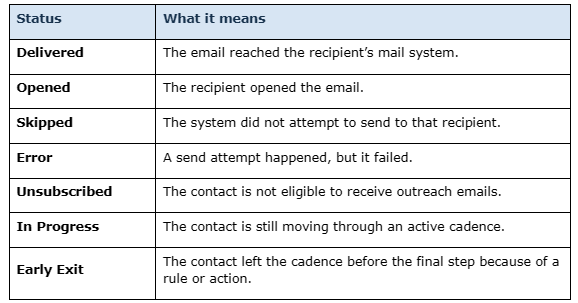
A skip and an error are not the same thing. A skip means nothing was sent. An error means a send was attempted but did not go through.
Common questions and practical guidance
What if I am not sure which success metric to choose?
Choose the metric that best matches the real goal of the outreach. If your goal is awareness, open rate may fit. If your goal is a reply, use reply rate. If the real goal is a gift, stage change, or another downstream action, choose the metric that reflects that outcome. For SMS sends, choose SMS Response Rate or SMS Click Rate.
What if my send fails because of DNS?
That usually means the domain setup has not been completed or verified yet. Users can keep preparing outreach, but an owner must finish DNS setup before sending becomes available.
What if I do not see the Text channel option when creating a bulk message?
Your organization may not have completed A2P 10DLC registration. Contact your administrator or refer to the Setting Up SMS & MMS Texting article.
What if I see unexpected recipients in a cadence?
Review whether the cadence is tied to a saved search and whether lock enrollment is turned on. Saved searches can continue to pull in new qualifying contacts over time.
What if my email looks wrong in preview?
Do not launch it yet. Review the formatting, merge fields, inserted template content, sender details, and links, then send yourself a test message before sending to the full audience.
What if I need more customized outreach than a bulk message allows?
Move to a cadence or prospect plan. Those options are built for step-by-step follow-up, timing, rules, and more tailored outreach.
Quick terms
Assets: The area where reusable email templates, SMS templates, and signatures are stored.
Auto-Reply: A message sent automatically to a constituent when they reply to an SMS. Replies are forwarded by email to the configured reply address.
Blackout dates: Dates or times when outreach should not be sent or assigned.
Branching: A rule that sends contacts down different paths based on a condition.
Cadence actions: Actions on a live cadence, such as removing a contact, skipping a wait, or skipping a manual step.
Channel: The delivery method for a bulk message — Email or Text (SMS).
Merge field: A placeholder that pulls in contact-specific details, such as a first name**, last gift amount, or a custom field value**.
Primary success metric: The main goal selected to measure whether the outreach worked.
Saved search: A reusable audience filter used to find or enroll contacts.
SMS Click Rate: A success metric that measures whether recipients clicked a link in a text message.
SMS Response Rate: A success metric that measures whether recipients replied to a text message.
SMS Template: Reusable SMS message content saved in Assets and available in the SMS composer.
Skip wait: An action that moves a contact past the current wait step immediately.
Reply
Content aside
- 4 mths agoLast active
- 82Views
-
1
Following