
Mobile: Navigating a Constituent Profile on your Signal iOS App
What is a constituent profile? Every constituent in EverTrue has a profile. A central record combining contact information, giving history, interactions, tasks, and AI-assisted insights for that person. You can open a constituent's profile from a search, from a list, from the map, or from a task or interaction linked to them.
Profile Header
At the top of every constituent profile:
Back button: Returns to the previous screen.
+ button (top-right): Opens a menu with five options: Add Task, Add To Trip, Add To List, Add Interaction, Add Proposal.
Avatar, name, and affiliation: Shown with class year or constituency type where applicable (for example, "Alum, Parent - Class of 1981"). A badge row under the name shows cadence step enrollment count — for example, "Cadence 0 · +7 more" indicates this constituent is currently enrolled in 8 cadence steps.
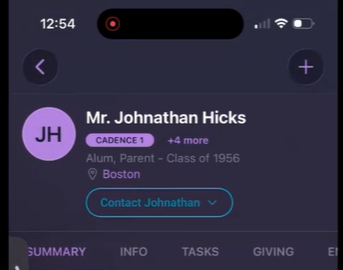
Address: Tappable; opens map/directions options.
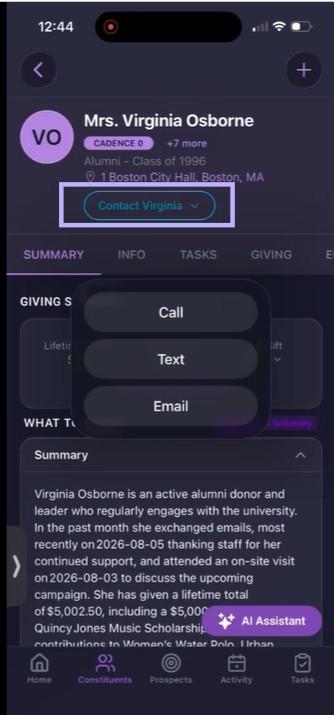
Contact [Name] button: Tap to open a dropdown with three options: Call, Text, and Email.
Profile Tabs
Below the header, a constituent's profile is organized into seven tabs:
Summary Tab
https://www.loom.com/share/49797ecc8afd4b1b986eab4d21fd1c6f
The Summary tab is the default tab. It contains the following information in this order:
Giving Summary (Lifetime Giving, Largest Gift, Last Gift),
AI-generated "What To Know" summary,
Donor Potential Score,
Pinned Comments,
Recent Interactions,
Assigned To (Solicitor),
My Top Fields (Remote ID, Constituency, Solicitation Codes, Prospect Status, Interests), and
Capacity Indicators.
See "Using AI Profile Summary on Your iOS App" and "Using EverTrue Pinned Comments on Your iOS App" for the sections that are documented.
Info Tab
The Info tab contains the following information in this order:
Bio
Career, Education history, with a "+ More" to expand
Primary Contact Info, showing primary phone and email with inline call/text/email icons, and a "+ More" to expand to additional contact methods including Addresses
Relationships -named people connected to this constituent, each with a relationship label and ID, tappable through to their own profile if they're also a constituent
- More Info -a scrollable list of your organization's own custom fields
https://www.loom.com/share/b921bd89d630480baa4936f020250f4d
Tasks Tab
The Tasks tab shows all tasks linked to the constituent and is separated by task status: Incomplete, Overdue, Completed. You can filter this view by All or by task type: Phone, email, sms, research, Thankview, Other. Tap on the task to see the details.
https://www.loom.com/share/cbf4653519cb41d39daa08432d8f585a
Giving Tab
This tab contains, in order: fund filter pills Total Giving and Annual Fund. This tab also shows Giving History summary cards of Last Gift, Largest Gift, Lifetime Giving, and Pledge Balance. These amounts are imported from your organization's database. Next in the tab is a graph and table for “How much has this constituent given?" by fiscal year, and an itemized Gift Transactions list below it. You can tap on the gift transactions to see more details.
https://www.loom.com/share/3803ed2ae9ce44babc455701f3e6f64b
Enrichment Tab
This tab is where you’ll find financial, philanthropic, real estate, Donor Potential Score, DonorSearch Rating, SEC holdings, Leadership Involvement, Interests, Career information, Social Media account links, other personal details, and noteworthy events. Visit Using Enriched Wealth Data to learn more about this enrichment data.
https://www.loom.com/share/72da469ed161409590cdfe9b5c95dc53
Interactions Tab
The interactions tab includes a feed of all interactions with this constituent, including pinned comments (highlighted in green, labeled Pinned EverTrue Comment). See "Using EverTrue Pinned Comments on Your iOS App" for detail on pinning and unpinning. You can also add interactions on this tab.
https://www.loom.com/share/76e12b15b206468d9c7750d86db74b9a
Proposals Tab
On this tab, proposals associated with a constituent are listed using summary tiles, detail view, and the ability to create or edit a proposal.
https://www.loom.com/share/92514d0a91284aab8f716fcb9f5232e2
If you have questions, contact EverTrue Support at genius@evertrue.com.
Content aside
- 1 mth agoLast active
- 16Views
-
1
Following